What Is RCS Messaging and How Does It Work?
Updated April 27, 2026
RCS (Rich Communication Services) is an upgraded form of traditional SMS that allows businesses and consumers to send dynamic, interactive messages. In addition to rich features like images, buttons, and real-time updates, RCS also supports verified sender profiles, helping recipients instantly recognize and trust who the message is from. Messages are delivered over mobile data or Wi-Fi, creating a more engaging and secure experience.
RCS enhances daily messaging activities and is the messaging protocol for the smartphone era, taking features you’re probably familiar with from apps like Facebook Messenger or WhatsApp and turning them into everyday standards. If your iPhone is updated to iOS18, RCS should already be active on your phone. If not, iPhone users may need to flip a toggle in Settings or update their phone software. Android users should navigate to Google Messages, tap their profile picture or icon to go to Message Settings, and then tap RCS chats to enable RCS.
Here’s what RCS messaging is and how it will impact your mass texting strategy.
What is RCS messaging?
RCS stands for “Rich Communication Services” and experts predict it will replace SMS in the near future. Think of it as an evolution of text messaging. It incorporates many of the features of popular messaging apps like iMessage or WeChat while still operating on a telecom network.
What is RCS chat? This is a synonym for RCS messaging, and the terms are used interchangeably. There are some differences between RCS and SMS, though.
RCS vs SMS: What’s the difference?
RCS messaging is like a next-generation SMS. There are a few key upgrades to note when comparing RCS vs SMS.
Take a look at this side-by-side chart comparison of SMS vs RCS to see what the difference is.
| Capabilities | RCS | SMS |
| Uses a data connection | Yes | Yes |
| Send read receipts or see what friends are typing | Yes | No |
| Send files | Yes, up to 100MB | No |
| Character limit | No | Yes, 160 characters |
What’s so special about RCS compared to SMS? Here are a few applications of the new technology:
- You can send read receipts and see when your friends are typing.
- You can send files directly through RCS. Like an enhanced version of MMS marketing, imagine getting your airline tickets or choosing concert seats directly from an RCS message.
- It’s easier to send multimedia elements such as GIFs or stickers.
- Group messages are streamlined, with more personalization options.
These are many of the features that smartphone users are familiar within their messaging apps, but with RCS you’ll be able to have this user experience when messaging anyone, regardless of the phone’s operating system.
When will you get RCS?
When can you use RCS messaging in the United States?
Currently, most major U.S. carriers including Verizon, AT&T, and T-Mobile support RCS, but some smaller providers may not. Nearly every T-Mobile Android comes with RCS Universal Profile 1.0 automatically built into the phone’s messaging app.
You can use RCS messaging when:
- Your carrier supports RCS, which is highly likely if you get service from Verizon, AT&T, or T-Mobile.
- You Have an RCS-Compatible Phone, which includes Android 5.0 or later, iPhones with iOS18 or later, Pixel 3, and Pixel 3XL.
- You use Google Messages, Samsung Messages, or another supported messaging app.
- Both you and the recipient have RCS enabled—even if you are using two different operating systems. If one person is only using SMS, the message will fall back to regular texting.
- You have mobile data or an active internet connection to send and receive messages.
As of 2026, billions of RCS messages are sent globally each day, reflecting rapid growth in adoption as carriers, Android devices, and Apple continue expanding support.
Businesses looking to take advantage of RCS don’t need to wait for a new phone number. With SlickText, you can add RCS to your existing toll-free, 10DLC, or short code number to activate a Verified Sender Profile. This allows customers to instantly recognize your brand, increasing trust and helping your messages stand out in crowded inboxes. To learn more about RCS for you business, start a chat with our team today.
History of implementing RCS
It wasn’t until 2016 that many U.S. carriers began supporting RCS. T-Mobile was the first carrier to launch RCS messaging in the United States, followed by Verizon, AT&T, and Sprint.
In 2016, the GSM Association, which is the trade body representing mobile operators, agreed to what they call a “Universal Profile” to aid the rollout of RCS. The Universal Profile is:
“A single, industry-agreed set of features and technical enablers developed to simplify the product development and global operator deployment of RCS.”
Cross-Carrier Messaging Initiative
To roll out RCS messaging in the United States, the big networks — Verizon, AT&T, and T-Mobile — formed a joint venture dubbed the Cross Carrier Messaging Initiative (CCMI) and announced in a joint press release in October 2019. These are the goals of the CCMI:
- Create more opportunities for meaningful business-to-consumer messaging. (This is great news for marketers and those who use mass text messaging as a marketing and communications technique, as we’ll expand upon below).
- Make it easier to send high-quality HD photos and videos privately via individual or group chat.
- Allow consumers the ability to interact with their favorite brands or take actions related to their favorite brands directly from their messaging app. These actions could be anything from ordering food or a ride share to paying bills, reserving a table, or confirming an appointment.
How to enable RCS messaging on Android
To enable RCS messaging, Android users should do the following:
- Navigate to Google Messages on your phone.
- Tap your profile picture or icon and then open Message Settings.
- Tap RCS chats.
- Turn on RCS chats to enable RCS messaging.
If for some reason you don’t see the option to turn on RSC chats, Google recommends troubleshooting by tapping “Chat Features” and then “Verify Your Number.”
You can also turn off RCS messaging on an Android by following the steps above.
How to enable RCS messaging on iPhone
In September 2024, Apple released iOS18, which introduced RCS messaging support for your iphone. To make sure RCS is enabled, iPhone users should do the following:
- Navigate to Settings on your iPhone.
- Scroll down and select Apps at the bottom of the screen.
- Select Messages from the available Apps.
- Scroll down until you see the Text Messaging section, with RCS Messaging listed at the top of the category.
- Click on RCS Messaging. On the next screen, if the toggle is green, RCS is enabled on your phone. If not, you can simply flip the toggle to turn on RCS Messaging on your phone.
If you don’t see these options on your iPhone, it may be time to update your phone software.
You can also turn off RCS messaging on an iPhone by following the steps above.
How can RCS messaging help marketers?
RCS messaging could provide a powerful tool for businesses looking to engage with their audience like never before. It has the potential to extend the bounds of creativity in your marketing campaigns and could streamline your efforts to connect with your clients.
Here are a few of the ways RCS messaging can improve the relationship between brands and their clients.
Easy to verify
Nothing disintegrates trust between your business and your audience faster than coming across as spammy. RCS messaging enables sender verification so your clients can easily recognize your 10-digit long code, toll-free, or short code number.
Send real-time updates
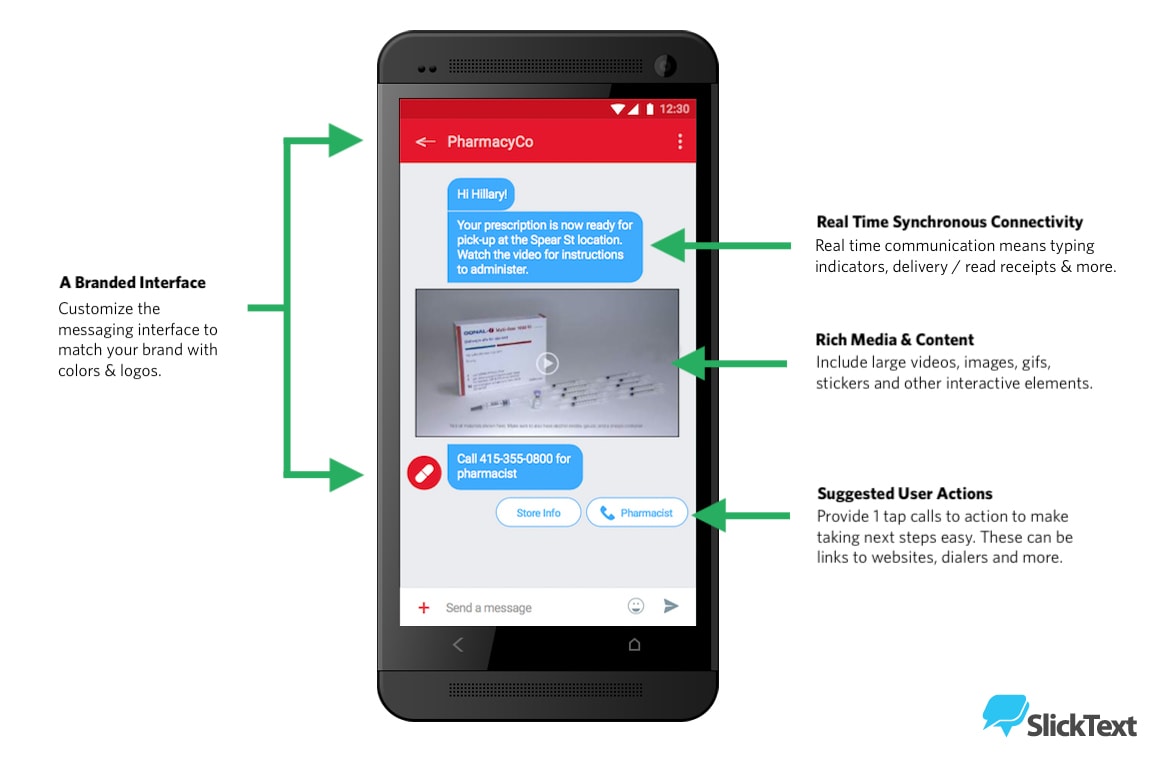
RCS messaging will allow companies to send automatic text messages on order statuses, boarding passes, seat selections, and upcoming appointments. Plus, you’ll be able to do all of this using multimedia to enhance your message. In this instance, it’s similar to MMS but a lot more flexible. You can send GIFs, videos, and loyalty cards directly through an RCS message.
Maximize flexible content options
Because RCS messaging doesn’t have the standard 160-character limit that SMS messaging does, you can write longer messages to your clients. Instead of skimping on words and finding abbreviations, you’ll have some leeway to inject your brand’s voice into the message. Plus, you can add special touches like audio, video, stickers, or high-resolution photos. You’ll be able to send PDFs, display product carousels, add calendars for scheduling, and, best of all, suggest a direct call-to-action that customers can immediately take.
Streamline your call-to-action
Nowadays, if a user wants to call your company or click on your website, they have to open their web browser or leave their messaging app. With RCS messaging, they’ll be able to click a button from the text message itself to call you or access certain elements of your website directly from the message.
This creates less friction in the call-to-action process which is likely to have the impact of creating more conversions. Essentially, you’ll lose fewer people along the way. In the image below, a pharmacy uses our HIPAA compliant texting software to improve the customer service experience when prescriptions are ready for pickup.
Why RCS Matters in 2026
RCS messaging has moved from a “next-gen” concept to a mainstream communication standard in 2026. What was once limited by carrier support and device fragmentation is now gaining widespread adoption, making it far more relevant for both consumers and businesses.
1. Cross-platform messaging is finally becoming a reality
One of the biggest shifts is the growing support for RCS across major ecosystems. With Apple adopting RCS alongside iMessage, the long-standing gap between Android and iOS messaging is shrinking. This means users can now experience richer, more consistent conversations regardless of device—bringing the industry closer to a unified messaging standard.
2. Improved branding and trust
RCS supports verified sender profiles, allowing businesses to display their name, logo, and branding directly in the message thread. This helps:
- Build trust with recipients
- Reduce spam concerns
- Increase message credibility
In an era where consumers are cautious about unknown senders, this is a major advantage.
3. Consumer expectations have changed
Today’s users expect messaging to feel like an app—not a basic text thread. Features like:
- Read receipts
- Typing indicators
- High-resolution media
- Interactive elements (buttons, carousels)
RCS delivers these experiences natively, without requiring users to download additional apps.
4. Businesses can deliver app-like experiences without apps
For businesses, RCS opens the door to highly interactive messaging experiences directly in the default messaging app. Instead of sending static SMS messages, brands can:
- Showcase products with images and carousels
- Add clickable buttons for actions (buy, book, confirm)
- Provide real-time updates and customer support
This reduces friction and increases engagement, especially compared to traditional SMS campaigns.
5. Higher engagement and conversion potential
Because RCS messages are visually rich and interactive, they naturally drive higher engagement. Users are more likely to:
- Read messages
- Click through
- Take action
For marketers, this translates into better performance metrics and more measurable ROI compared to standard text messaging.
6. The shift toward conversational commerce
RCS is helping accelerate the move toward conversational commerce, where customers can browse, ask questions, and complete transactions—all within a messaging conversation. This aligns with how people already prefer to communicate: quickly, casually, and on mobile.
In short: RCS matters in 2026 because it transforms messaging from a simple communication tool into a rich, interactive customer experience channel—bridging the gap between SMS, apps, and chat platforms.
How does RCS impact SlickText?
SlickText customers can add RCS to their existing toll-free, 10DLC, or short code numbers to unlock a Verified Sender Profile. This allows your business name and branding to appear directly in supported messaging apps, helping customers instantly recognize who is contacting them.
By combining the reach of SMS with the trust and recognition provided by RCS verification, businesses can create a more professional messaging experience without changing their existing texting number. Contact our team to learn more about enabling RCS for your account.
Frequently Asked Questions
What does RCS stand for?
RCS stands for Rich Communication Services. It’s an advanced messaging protocol with features like read receipts, high-quality media sharing, and interactive buttons.
Is RCS the same as iMessage?
No, RCS and iMessage are different. iMessage is Apple’s proprietary messaging service that only works between Apple devices. RCS is an open standard that works across both iPhone and Android devices, allowing enhanced messaging features regardless of what phone you use.
Do I need to download an app to use RCS?
No separate app is needed. RCS works through your phone’s default messaging app—Google Messages on most Android devices or the Messages app on iPhones with iOS 18 or later.
Is RCS free to use?
RCS uses your mobile data or Wi-Fi connection, similar to apps like WhatsApp. While there’s no specific charge for RCS, it will consume data from your plan. If you’re connected to Wi-Fi, it won’t use your cellular data.
Is RCS messaging secure?
RCS messages sent through Google Messages include end-to-end encryption for one-on-one conversations. However, encryption standards may vary depending on your messaging app and carrier implementation. Group chats and messages between different RCS implementations may not be encrypted.
What types of interactive features can I include in business RCS messages?
RCS supports suggested actions (clickable buttons), product carousels, appointment scheduling, payment options, location sharing, and rich media like videos and high-resolution images—all within the message itself.
How do I turn off RCS if I don’t want to use it?
On Android: Open Google Messages > tap your profile icon > Message Settings > RCS chats > toggle off. On iPhone: Settings > Apps > Messages > RCS Messaging > toggle off.







