SMS Segmentation: How to Send More Relevant Text Messages
Sending every single text to your entire list is the easiest way to run mass texting campaigns. But not every subscriber needs every message. A first-time subscriber, a loyal repeat customer, and someone who hasn’t clicked a link in three months are all looking for something different from your business.
With segmentation, you don’t have to send them all the same thing. In this guide, we’ll explain what SMS segmentation is, which segments to create first, and how to build and use them in SlickText.
TL;DR: How to Use SMS Segmentation
SMS segmentation means grouping your subscribers by shared data or behavior so you can send them more relevant texts. Start small, use the data you already have, and add more segments as you collect more information.
- Start with segments that need no extra data, such as new subscribers, engaged subscribers, unengaged subscribers, and opt-in source.
- Add data-driven segments like birthday month, location, and interests once you collect that information through web forms.
- Use purchase data if you sell online. Shopify data lets you segment by order and cart activity.
- Send smaller, more targeted campaigns. In our benchmark research, smaller sends had higher median click rates than larger ones.
- Use segments everywhere you send, including mass texting campaigns and automated texting workflows.
- Keep it manageable. Two or three well-chosen segments are plenty to start.
What Is SMS Segmentation?
SMS segmentation is the practice of dividing your text subscribers into smaller groups based on information you know about them or actions they’ve taken. Instead of sending one message to everyone, you send each group a message that matches where they are with your business.
Here’s a simple example. Say a boutique wants to promote a new fall collection.
Without segmentation, every subscriber gets the same text:
Our fall collection just dropped! Shop now: [link]
With segmentation, the boutique might send:
- New subscribers a reminder that their welcome discount works on the new collection
- Subscribers who clicked recently early access before the collection goes live to everyone
- Subscribers who haven’t clicked in months a short message asking if they still want to hear from them instead of another promotion
Segmentation vs. Personalization
Segmentation and personalization work together, but they do different jobs:
- Segmentation decides who receives a text.
- Personalization changes what the text says for each person, usually with merge tags like a first name.
Adding someone’s name to a text won’t do much if the message isn’t for them in the first place. Get the right people first, then make it personal.
Segments vs. Lists in SlickText
Once you start building segments in SlickText, you’ll notice there’s also something called lists which, along with segments, help you organize contacts. The two features work slightly differently:
| Lists | Segments | |
| How contacts get in | Contacts are added to the list, usually when they opt in | Contacts match automatically based on their data and behavior |
| How they change | Membership stays the same until a contact is added or removed | Membership updates as contact data or behavior changes |
| Best for | Permanent groupings, like separate programs or brands | Targeting based on data, like birthday month, location, or click behavior |
A simple way to think about it is that lists are who signed up for what, and segments are who fits a description right now.
Why SMS Segmentation Matters: What Our Benchmark Data Shows
It’s tempting to assume that texting more people always means more results, but our data suggests it’s not that simple.
For our SMS Marketing Benchmark Report, the SlickText research team analyzed more than 400 million messages across nearly 75,000 campaigns. We looked at actual campaign results rather than surveys or self-reported data.
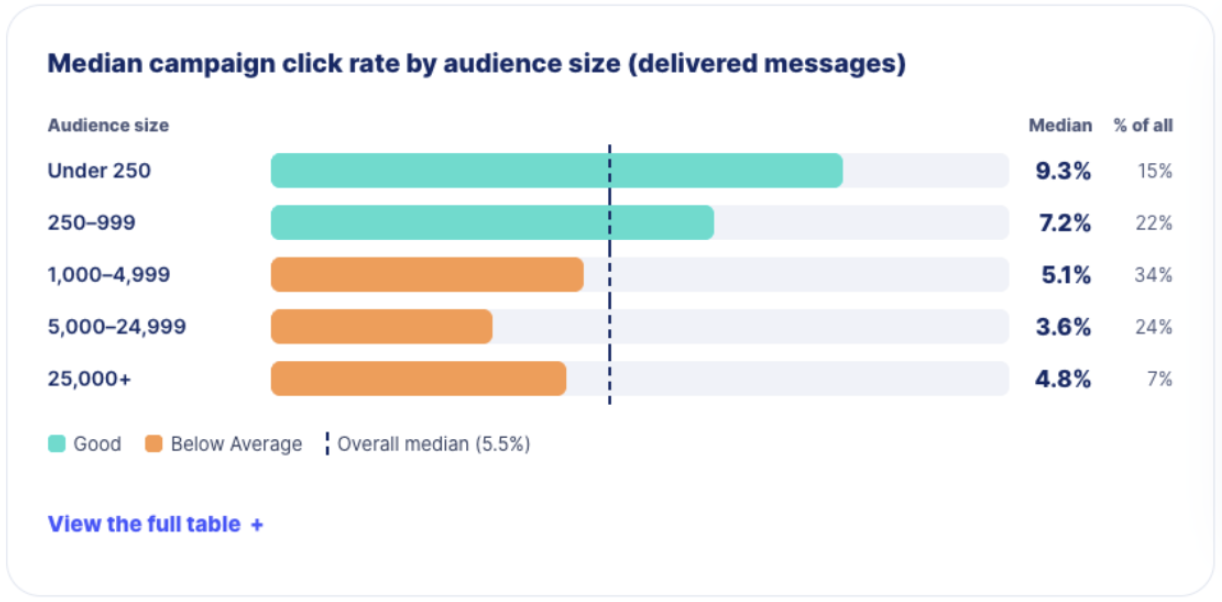
One of the clearest patterns that came to light is that larger sends had lower click rates.
| Audience size (delivered messages) | Median click rate | Tier | % of all campaigns |
| Under 250 | 9.3% | Good | 15% |
| 250–999 | 7.2% | Good | 22% |
| 1,000–4,999 | 5.1% | Below average | 34% |
| 5,000–24,999 | 3.6% | Below average | 24% |
| 25,000+ | 4.8% | Below average | 7% |
Campaigns sent to fewer than 250 people had a median click rate of 9.3%. For campaigns sent to 5,000–24,999 people, the median was 3.6%, less than half of that.
You might think that’s because different kinds of businesses send at different sizes. But we saw the same thing when we compared campaigns from the same senders. Every time a sender doubled the size of their audience, their click rate tended to drop by about 13%.
What This Means For You
As your list grows, you don’t need to send every message to every subscriber. Focus on keeping engagement high by sending timely, relevant messages to smaller groups based on their interests and behavior.
The data doesn’t mean big sends are necessarily bad. Some messages, like a store closure or a major sale, should go to everyone. But for most promotions, a well-chosen segment is more likely to get clicks than a full-list blast.
Segmentation also helps in two other ways:
- Fewer opt-outs. Subscribers who keep getting texts that don’t apply to them are more likely to unsubscribe.
- Fewer wasted credits. Every text costs a message credit, so sending fewer irrelevant messages helps your SMS budget go further.
Which SMS Segments Should You Create First?
You don’t need dozens of segments to see results. The best place to start is with segments built on data SlickText already collects for you, then add more as you gather customer information.
Here’s a quick look at the segments we recommend for most small businesses:
| Segment | Data you need | Best for |
| New subscribers | Subscribe date (collected automatically) | Welcome offers and first purchases |
| Engaged subscribers | Link clicks (collected automatically) | Early access, launches, and limited offers |
| Unengaged subscribers | Link clicks (collected automatically) | Re-engagement and sending less often |
| Birthday month | Birthdate | Birthday offers |
| Location | City, ZIP code, area code, or preferred store | Local events and store-specific news |
| Interests | Custom field from your signup form | Product or service recommendations |
| Purchase activity | Shopify integration | Repeat purchases, VIP offers, and abandoned carts |
For each segment below, we’ll cover what data you need, when to use it, and a sample text you can adapt.
Segments You Can Build With Data You Already Have
These segments rely on information SlickText captures automatically, so you can build them from day one.
1. New Subscribers
People who just joined your list are paying the most attention. They know why they signed up, and they’re waiting to see if it was worth it.
- Data needed: Subscribe date
- When to use it: Reminders about an unused signup discount and promotions for items that are popular first-time purchases
- Segment setup: Contact fields created is in the last 30 days
Try this sample text:
Hi {{first_name}}! A quick reminder that your 10% off code WELCOME10 is good through Sunday. Shop now: [link]
Tip: SlickText automatically sends a confirmation text when someone signs up, so that’s where you’ll deliver your sign-up offer. Then use this segment to send a follow-up a week or two later, reminding new subscribers to use their offer before it runs out.
If your Shopify store is connected, add AND Order does not exist ever to the segment. That way, people who’ve already made a purchase won’t get the reminder.
2. Engaged Subscribers
Subscribers who recently clicked a link in one of your texts have already shown interest, so are most likely to act on your next message.
- Data needed: Link clicks
- When to use it: Product launches, early access, limited stock, and VIP perks
- Segment setup: Link Clicked is any link in the last 60–90 days
Try this sample text:
You’re first in line, {{first_name}}! Shop our holiday collection a full 24 hours before everyone else: [link]
3. Unengaged Subscribers
These are subscribers who haven’t clicked anything in a while. Sending them every promotion rarely wins them back, and it uses credits on people who aren’t paying attention.
- Data needed: Link clicks
- When to use it: Re-engagement offers, preference check-ins, and last-chance win-back campaigns
- Segment setup: Link Clicked is not any link in the last 90 days
The right time window here depends on how often you text and what you sell. A store selling something people run out of, like hand soap, should expect subscribers to click fairly often, so 30 to 60 days might make sense. A seasonal business like a tax prep service might go most of the year without many clicks, so a longer window, or one based on last season, works better.
Try this sample text:
Hi {{first_name}}, we haven’t seen you in a while! Here’s 20% off anything this week, just for you: [link]. Not interested anymore? Reply STOP to opt out.
If someone doesn’t respond to your re-engagement message, consider texting them less often rather than including them in every campaign.
Segments to Build Once You Collect More Data
These segments depend on information subscribers share with you, usually through a web form or popup when they sign up. If you’re not collecting it yet, add one or two fields to your signup form, but only ask for information you plan to use.
4. Birthday Month
Birthday texts are one of the easiest ways to make a subscriber feel recognized, and they work for almost any type of business.
- Data needed: Birthdate
- When to use it: Birthday discounts, freebies, and loyalty rewards
- Segment setup: Birthdate month is [current month]
Try this same text:
Happy birthday month, {{first_name}}! Come in any time in [month] for a free dessert with any entrée. Just show this text.
Tip: Segmenting by month (rather than the exact date) lets you send one campaign at the start of each month. If you’d rather text people on their actual birthday, set up a birthday automation instead.
5. Location
If you have more than one location, or your customers are spread across a region, location helps you avoid texting people about events they can’t attend.
- Data needed: City, ZIP code, area code, or preferred store location (you’ll need to set up a custom field for Preferred store location)
- When to use it: Local events, store-specific hours or closures, and weather-related offers
- Segment setup: City is [Nashville] OR Preferred store is [Downtown]
Try this sample text:
Hi {{first_name}}! Our Nashville store is hosting a customer appreciation night this Thursday from 5–8 PM. Free snacks, 20% off everything. See you there?
6. Interests or Preferences
Asking subscribers what they care about is the most direct way to send them more relevant texts.
- Data needed: A custom field from your signup form, such as product category, service type, or content preference
- When to use it: New arrivals, category-specific sales, and recommendations
- Segment setup: Interest contains [Dog]
Try this sample text:
{{first_name}}, new arrivals for your pup just landed: [link]. Tap to shop new chew toys, cozy beds, and fall sweaters.
If You Sell Online: Purchase-Based Segments
Selling online gives you some of the most useful segment data out there. You can see what people bought, what they spent, and what they left in their cart.
7. Purchase Activity
If you connect your Shopify store to SlickText, you can segment contacts based on their cart and order activity. That opens up some of the most valuable segments for an ecommerce business.
- Data needed: Shopify integration
- When to use it:
- Recent purchasers: Thank-you messages, reviews, and related products
- High-value customers: VIP offers based on order total
- Past buyers of a specific product: Restock and refill reminders
- Segment setup: Order exists in the last 30 days or Order total is greater than $150 in the last 30 days
Try this sample text:
Thanks for being one of our best customers, {{first_name}}! As a thank-you, enjoy free shipping on your next order, no minimum. Shop now: [link]
Tip: Send abandoned cart reminders as an automated workflow rather than a mass text. That way, each reminder goes out shortly after the person leaves their cart, while they’re still thinking about it.
Every SlickText user also gets 10 built-in workflow templates for cart abandonment and checkout abandonment. They range from a single simple reminder to more complex multi-step flows, and some include A/B testing so you can see which message gets more people to finish their order.
How Many Segments Do You Need?
Short answer: Fewer than you might think. The more segments you have, the more texts you’ll need to write and the more results you’ll need to keep track of.
When segments get too small, it also becomes hard to tell whether a campaign worked or whether you just got lucky with a handful of people.
Here’s a realistic plan for a solo marketer:
- Month one: Build your new subscriber, engaged, and unengaged segments.
- Month two: Add one data-driven segment, like birthday month or location.
- After that: Add new segments only when you have a specific campaign in mind for them.
How to Create a Segment in SlickText
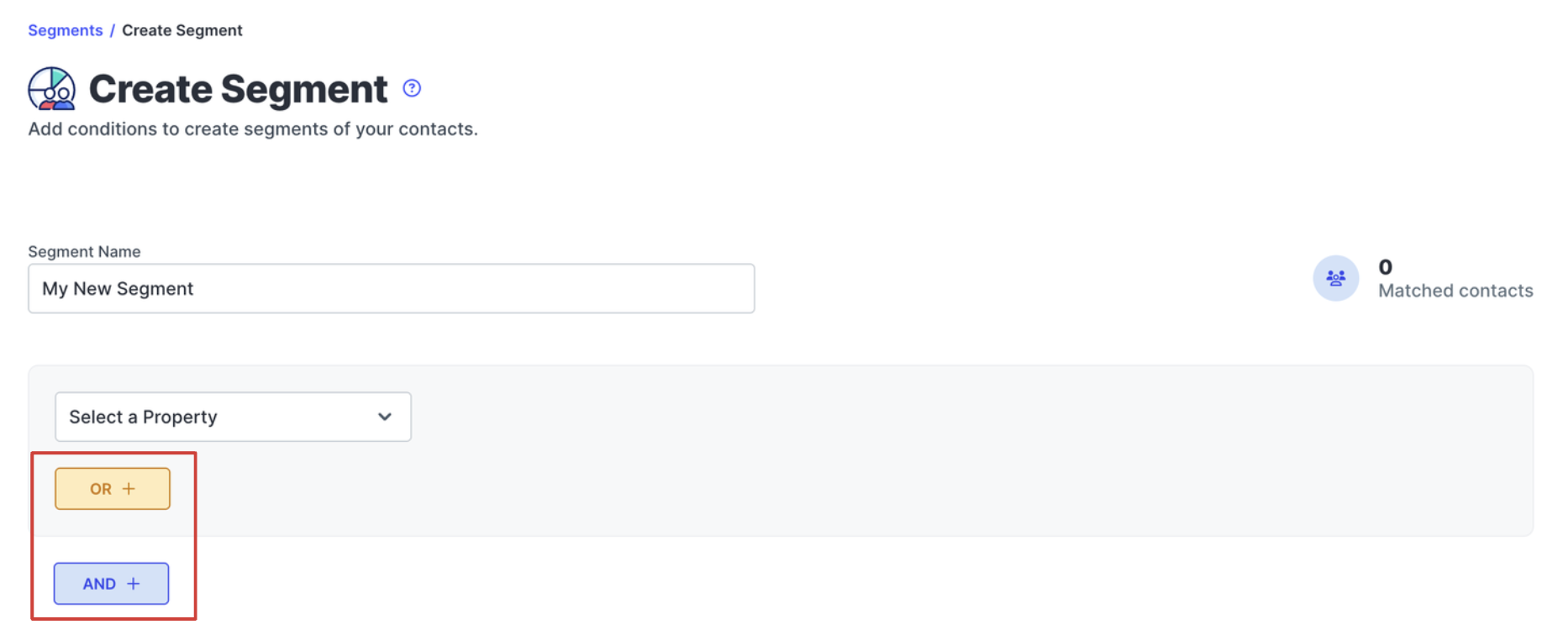
Every SlickText segment is made of three parts: a property (the data you’re filtering on), a condition (like “is,” “is not,” or “is greater than”), and a value. You can combine as many of these rules as you need.
Here’s how to create one:
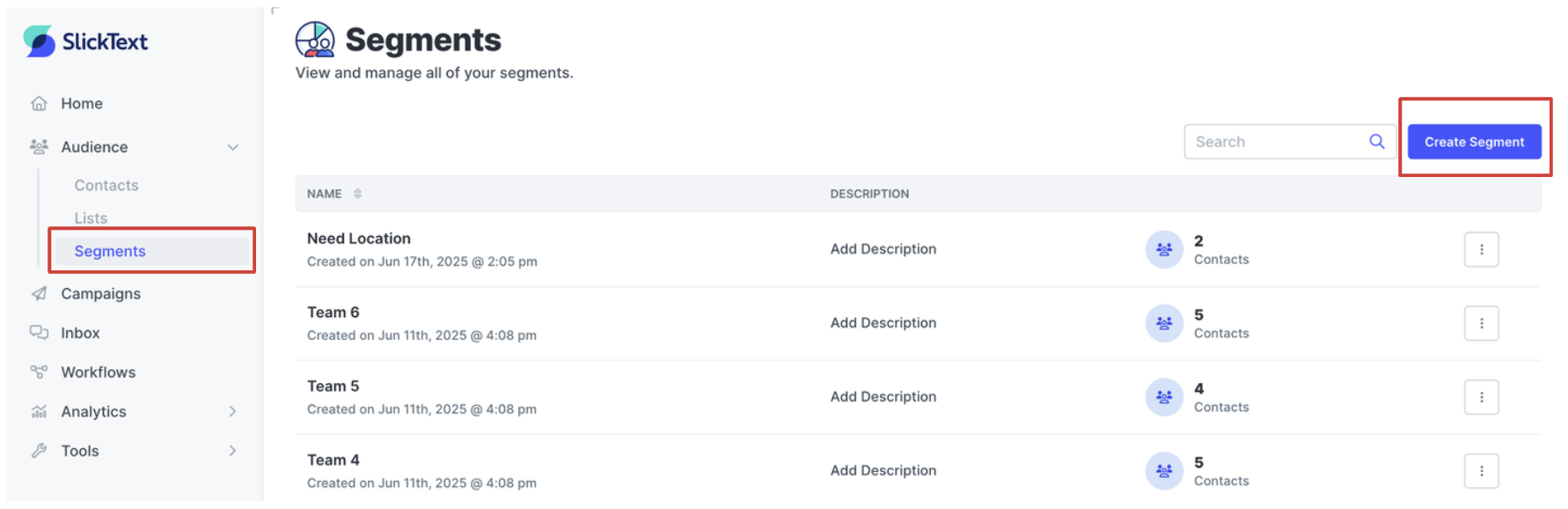
- Go to Segments. Log in to SlickText and click Segments in the left navigation bar, then click Create Segment.
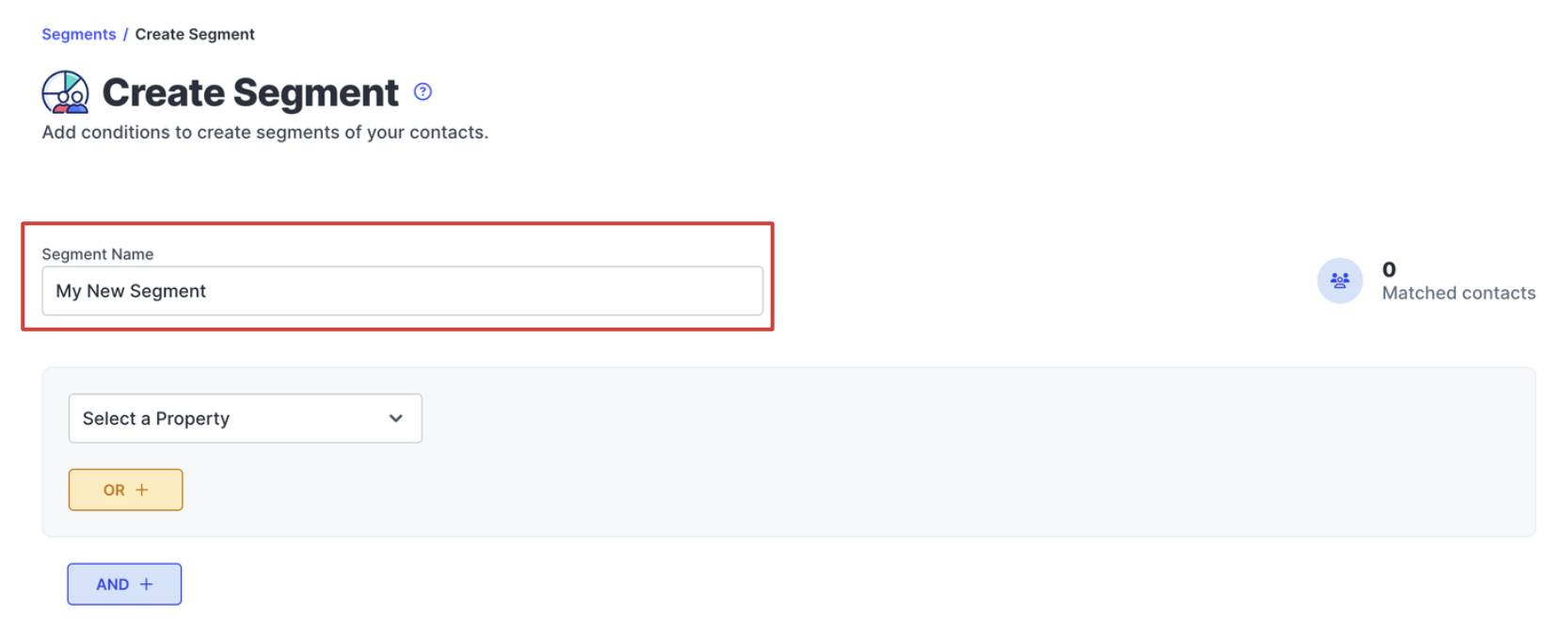
- Name your segment. Use a name that tells you who’s in the segment, like “Engaged – clicked in last 90 days” or “Birthday – current month.” You’ll see this name when choosing who to send a campaign to.
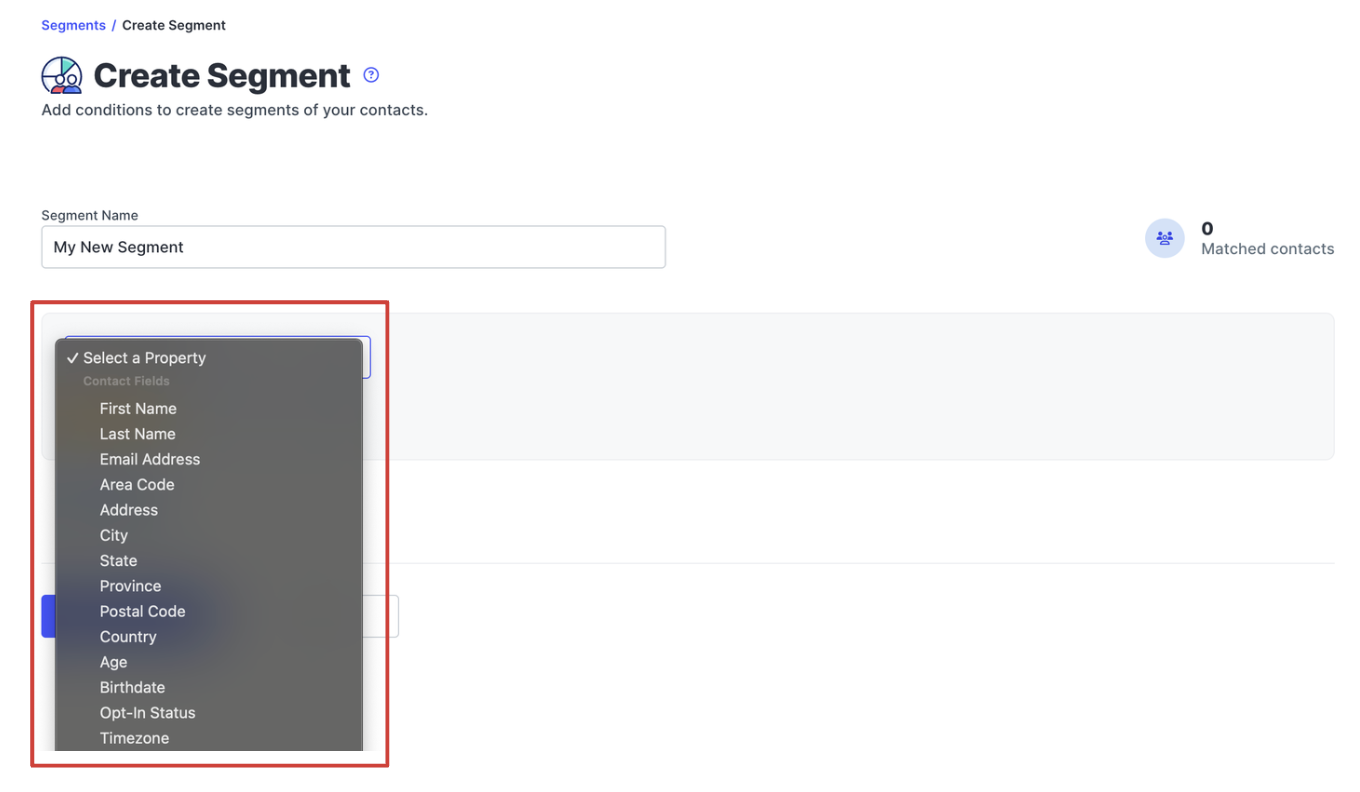
- Choose a property, condition, and value. Select the property you want to filter on, pick a condition, then select or enter a value. The conditions available depend on the property’s data type. Text fields use options like “contains,” number fields use options like “is greater than,” and date fields let you filter by a full date or just the month.
- Add AND or OR rules if you need them. Use AND to narrow your segment (contacts must match every rule). Use OR to widen it (contacts can match any rule).
- Save your segment. Click Save, or use the dropdown to Save and View Contacts or Save and Send Campaign.
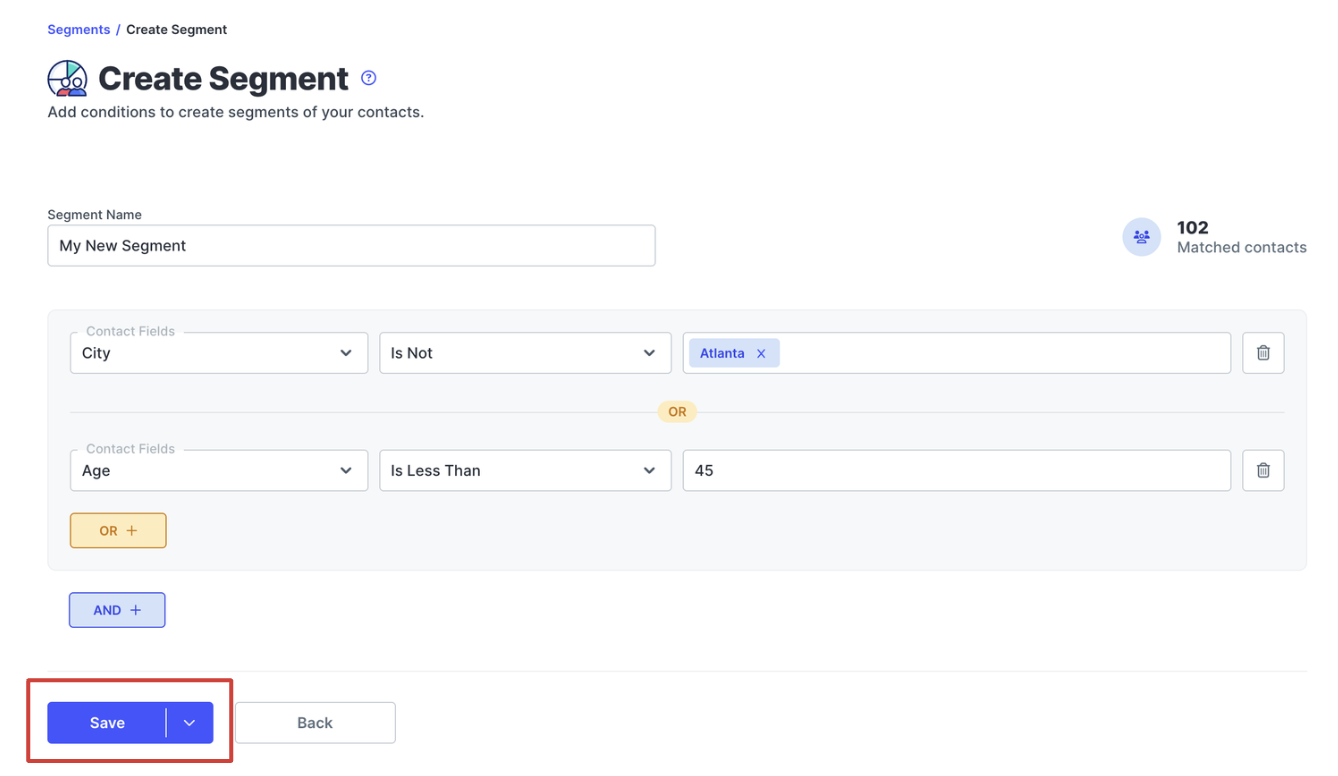
Once it’s saved, you can view, edit, clone, or delete your segment from the Segments page.
Example: Build an Unengaged Subscribers Segment
Here’s what segment #3 from above looks like in practice:
- Name: Unengaged – no clicks in 90 days
- Property: Link Clicked
- Condition: Is Not
- Value: Any link (you must select a specific link for this to work)
- Date range: Last 90 days
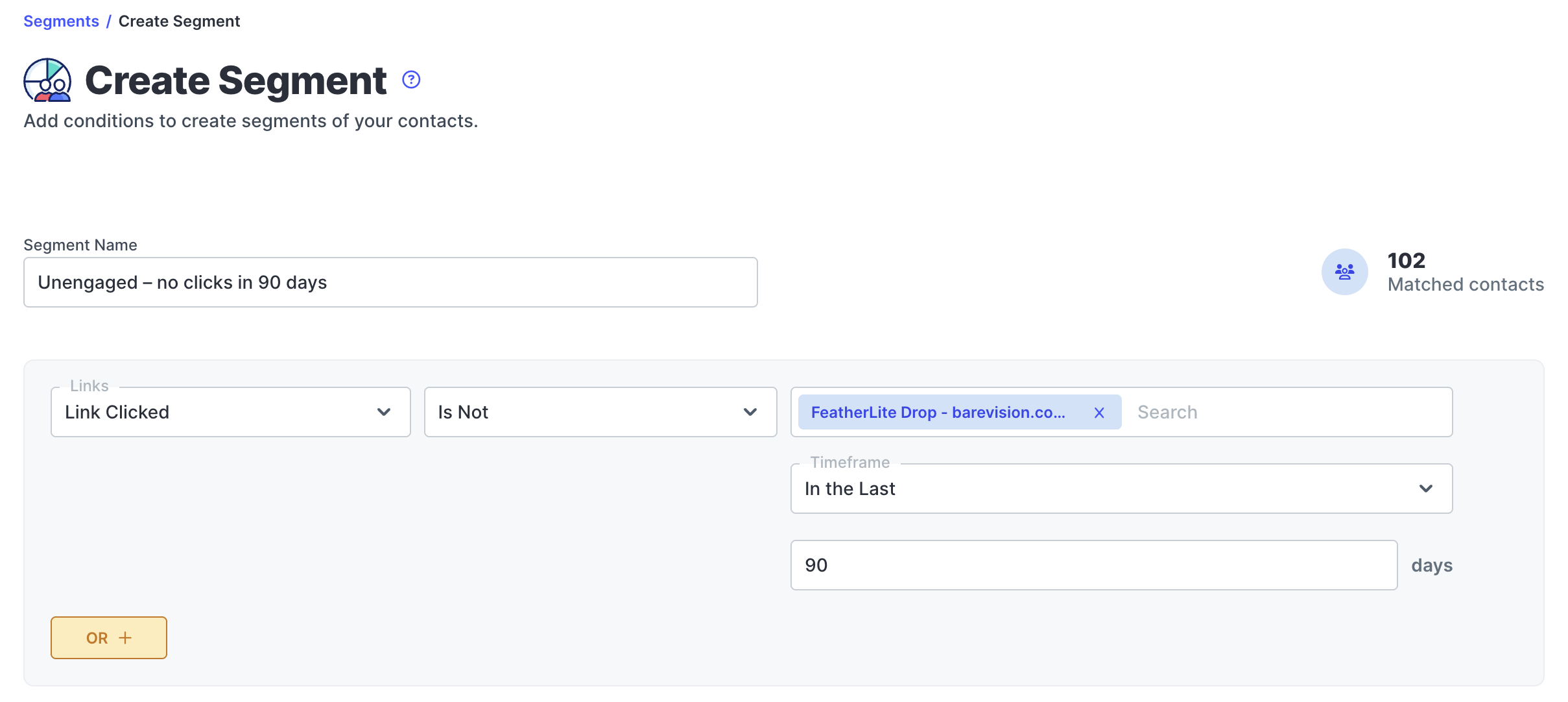
Want to make it more specific? Add an AND rule, such as Contact fields created is before 09/30/2026, so brand-new subscribers who haven’t had a chance to click yet aren’t included.
AND vs. OR: A Quick Example
These two segments look similar but they reach different audiences:
- City is Nashville AND Link Clicked in the last 90 days = engaged subscribers in Nashville only
- City is Nashville OR Link Clicked in the last 90 days = everyone in Nashville, plus every engaged subscriber anywhere
If your segment is much bigger or smaller than you expected, check whether you used the right one.
Tip: Contacts with an empty field won’t match segments based on that field. For example, subscribers without a birthdate on file won’t appear in a birthday segment. That’s another reason to collect key details when people sign up through a web form.
How to Use Segments in Campaigns and Automations
Once you’ve built a segment, you can use it anywhere you send messages in SlickText.
Send a Targeted Campaign
When you create a mass text campaign, choose your segment as the audience instead of your full list. You can also start from the Segments page by choosing Save and Send Campaign or selecting Send Campaign from a saved segment’s menu.
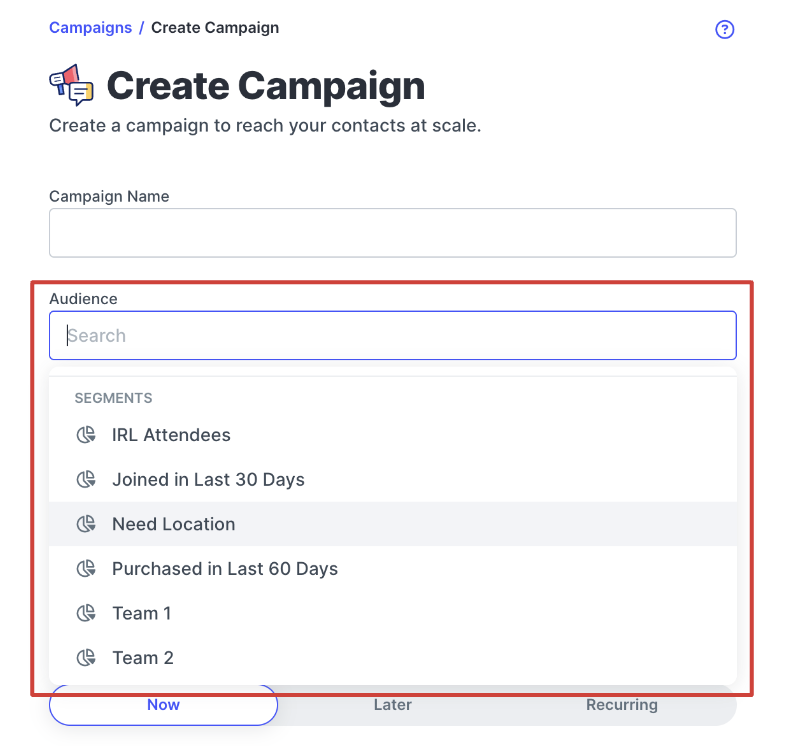
Before you send, check how many contacts are in the segment. If the number looks off, review your AND and OR rules.
Follow Up Based on Clicks
One of the most useful ways to use segments is to retarget subscribers after a campaign. Create a segment with Link Clicked set to the link from your last campaign, then:
- Text the people who clicked with a next step, like a reminder that the sale ends tonight
- Text the people who didn’t click with a different angle or a better offer
Try this sample text:
Hi {{first_name}}, last chance! Our fall sale ends at midnight. Everything’s still 25% off: [link]
This keeps your follow-ups relevant and means subscribers who’ve already acted don’t get the same pitch twice.
Start Sending More Relevant Texts
You don’t need a huge list or complicated data to start segmenting. A new subscriber segment, an engaged segment, and an unengaged segment are enough to make your next campaign more relevant than a full-list blast.
As you collect more information, add segments for birthdays, locations, interests, or purchases. Pay attention to which ones get the most clicks and the fewest opt-outs.
With SlickText, you can build segments from contact data, link clicks, opt-in sources, and Shopify activity, then use them in both mass texting campaigns and automated workflows. Every feature, including segments, is included on every plan.
Frequently Asked Questions About SMS Segmentation
What is SMS segmentation?
SMS segmentation is the practice of dividing your text message subscribers into smaller groups based on shared information or behavior, such as when they joined, whether they’ve clicked recent links, where they live, or what they’ve purchased. It lets you send each group messages that are more relevant to them.
What’s the difference between SMS segmentation and personalization?
Segmentation decides who receives a message. Personalization changes the content of a message for each recipient, often using merge tags like product purchased, store location, or favorite item. The most effective SMS campaigns use both.
How many SMS segments should a small business have?
Most small businesses can start with two or three segments, such as new subscribers, engaged subscribers, and unengaged subscribers. Add more once you’re collecting additional data and have a specific campaign in mind for each new segment.
What data do I need to segment my SMS list?
You can start with data your SMS platform collects automatically, like subscribe date, link clicks, and opt-in source. For more targeted segments, collect details such as birthday, location, or interests through a web form or popup when people sign up. If you sell online, connecting your ecommerce store adds purchase and cart data.
Do I need a large SMS list to benefit from segmentation?
No. In SlickText’s benchmark research, campaigns sent to fewer than 250 people had the highest median click rate, at 9.3%. Even a small list can benefit from sending more targeted messages.
What’s the difference between a list and a segment in SlickText?
A list is a group contacts are added to, usually when they opt in, and membership stays the same until someone is added or removed. A segment is a filter that automatically includes contacts who match certain rules, such as a birth month or recent link click, and updates as their data changes.


