SMS Automation for Small Business: 8 Examples to Get You Started
SMS automation for small business means using pre-built workflows to send text messages automatically when a customer takes a specific action — like joining your list, making a purchase, or abandoning a cart — so you can keep up with customer communication without doing it all by hand.
Sending each of these messages manually is one more task on an already full plate. Text message automation fixes that: set up a workflow once, and the message goes out on its own whenever the trigger happens.
You don’t need a complex system to see results. Most small businesses get the most value by starting with one interaction they’re already handling manually, or one they know they should be doing more consistently.
We looked at the 5,134 most recent SMS workflows built on SlickText. 42.25% (2,169 workflows) started from a pre-built template — and Welcome Series alone accounted for nearly 1 in 7 of them.
See the breakdown of top templates below. Grouped rows combine related template variants
| Template Type | Workflows | % of Templated Workflows |
| Welcome Series | 313 | 14.43% |
| Collect Data (Email, First/Last Name, Address — Scripted & AI Agent) | 292 | 13.46% |
| Drip Series | 260 | 11.99% |
| Cart, Checkout & Website Abandonment | 212 | 9.77% |
| Conditional Drip Series | 130 | 5.99% |
| Review Request, Product Review, or NPS Question | 101 | 4.66% |
| Happy Birthday | 90 | 4.15% |
| First Purchase Thank You or Next Purchase Incentive | 36 | 1.66% |
| Order & Shipping Updates | 26 | 1.20% |
| Customer Winback Drip Series | 22 | 1.01% |
The takeaway: Small businesses overwhelmingly start with welcome and nurture sequences, followed by contact data collection and abandonment recovery — while order updates and winback campaigns remain comparatively underused relative to how much most businesses rely on repeat customers.
Is SMS Automation Worth It for a Small Business?
You don’t need thousands of customers or a dedicated marketing department to benefit from SMS automation.
In many cases, automation is especially useful for small businesses because it helps you keep up with repetitive communication without creating more manual work.
SMS automation can help you:
- Save time on repetitive tasks. Build a process once instead of repeatedly sending the same type of message.
- Follow up more consistently. Customers don’t get missed because your day got busy.
- Reach customers at relevant moments. Trigger messages based on actions, dates, purchases, and other events.
- Personalize more communication. Customer data and behavior can determine what someone receives next.
- Keep customers engaged after the first interaction. Continue the conversation after a signup, purchase, or other customer action.
You don’t need to automate everything. Just look for the parts of your customer journey that repeat often enough to be worth setting on autopilot.
Here are eight places to start — with SlickText workflow templates that make each one quick to set up.
| Automation Purpose | Trigger | SlickText Template(s) |
| Welcome New Subscribers | Customer joins your SMS list | Welcome Series, Drip Series, Conditional Drip Series |
| Collect Customer Information | New contact is created | Collect Email, Collect First and Last Name, Collect Address |
| Request Feedback and Reviews | After a purchase or interaction | Review Request, Product Review, NPS Question |
| Follow Up After a Purchase | Customer makes a purchase | First Purchase Thank You, Next Purchase Incentive |
| Win Back Past Customers | 30 or 75 days since last purchase | Customer Winback – 30 Days, Customer Winback – 75 Days |
| Recover Abandoned Carts, Checkouts, and Browsing | Customer leaves website, cart, or checkout without purchasing | Abandoned Cart, Abandoned Checkout, Abandoned Website |
| Send Order and Shipping Updates | Order status changes | Order Confirmed, Shipment Confirmed, Shipment Out for Delivery, Shipment Delivered, Order Canceled |
| Send Birthday Messages | Customer’s birthday approaches | Happy Birthday |
1. Welcome New SMS Subscribers
SlickText templates: Welcome Series, Drip Series, Conditional Drip Series
When someone joins your SMS list, you get one shot at a first impression. A welcome automation makes sure every new subscriber gets a strong one — without you lifting a finger. (If you’re still working on growing that subscriber list in the first place, that’s worth sorting out before you worry about what happens after someone joins.)
It’s also the most common starting point among SlickText templates in our data: Welcome Series was the single most-used template, accounting for 14.43% of all template use. That tracks — almost any business building an SMS list has new subscribers to greet.
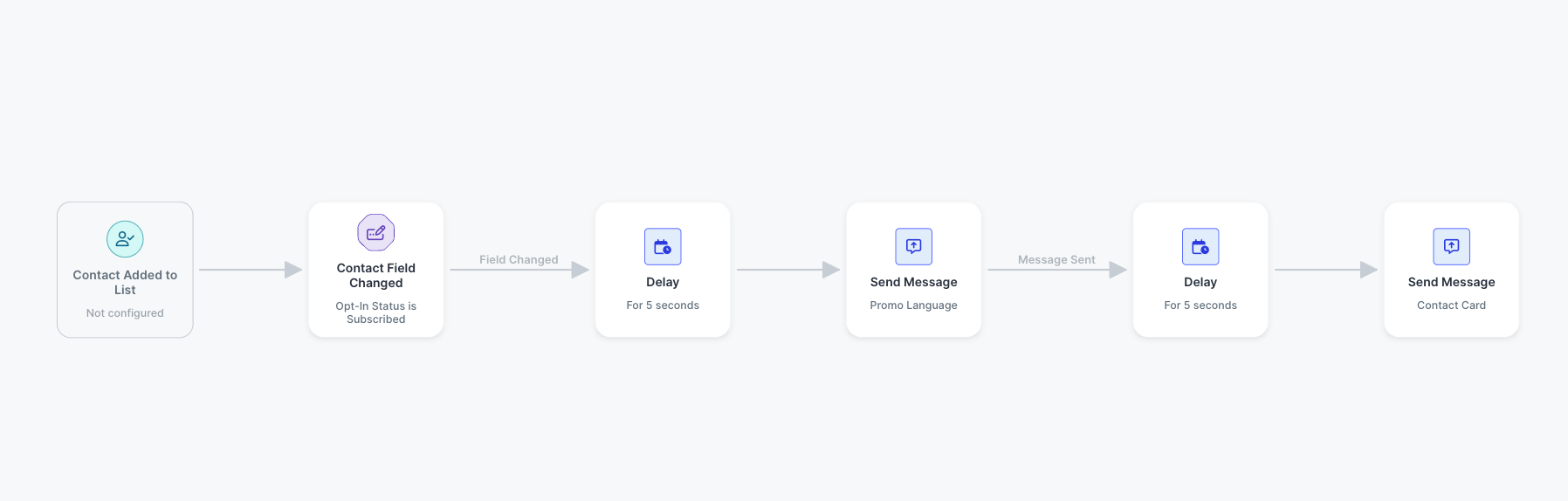
SlickText’s Welcome Series template sends a sequence of messages triggered when a contact is added to a specific list. A simple version might look like:
Subscriber joins list → Welcome message → Wait → Share an offer or useful info → Wait → Follow-up message
Your first message can deliver the incentive you promised at signup. The messages that follow can introduce popular products, explain a service, promote your loyalty program, or nudge subscribers toward another action.
More advanced setups adjust what happens next based on customer data or behavior:
- Customer takes an action → Check a condition → Send the matching message
That progression — from simple sequence to targeted automation — shows up clearly in the usage data. Drip Series was the second-most-used template (11.99%), and Conditional Drip Series added another 5.99%.
Why You Should Automate A Welcome Series
New subscribers are already interested — they just opted in. Automation lets you capitalize on that interest while it’s fresh, whether they sign up at noon, midnight, or on a Sunday.
It’s also one of the simplest workflows to set up conceptually, which makes it a smart first automation if you’re new to SMS marketing.
2. Automatically Collect More Customer Information
SlickText templates: Collect Email, Collect First and Last Name, Collect Address — and their AI Agent counterparts
A phone number gets someone onto your SMS list. Additional customer information is what turns that number into a usable profile — and it’s clearly not an afterthought for most businesses.
Across scripted and AI Agent versions combined, data collection is the second-most-used automation category on SlickText, behind only Welcome Series and ahead of drip campaigns, abandoned-cart recovery, and every other category on the platform.
If you didn’t collect this information on your web form, you can still gather it after signup. Collecting it upfront on the form can save you message credits, but every additional field adds friction that could cost you sign-ups—so be intentional about which fields are actually worth asking for there.
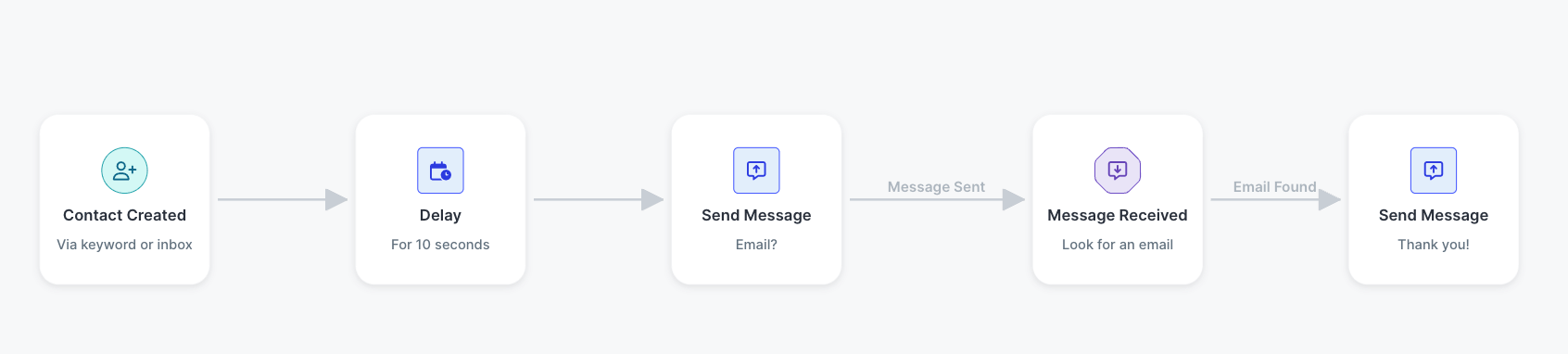
Instead of collecting that information manually, you can automate the process — either with a scripted, single-question workflow or with an AI Agent version that can hold a more natural back-and-forth. In our own usage data, each pair splits roughly like this:
- Name: Collect First and Last Name (4.20%) vs. Collect First and Last Name – AI Agent (2.63%)
- Email: Collect Email (2.21%) vs. Collect Email – AI Agent (1.48%)
- Address: Collect Address (1.52%) vs. Collect Address – AI Agent (1.43%)
The scripted version still leads each pair, but the AI Agent split is close enough — roughly a third to nearly half of usage in each category — that it’s clearly not a niche option. A retailer might collect an email address so it can communicate with customers across both SMS and email. A service business might collect a name to make future communication more personal. The AI Agent versions are worth considering specifically when the collection should feel like a conversation rather than a form.
You don’t have to ask for everything at once. You can start with the piece of information that’s most useful to your business, and decide separately whether a scripted or AI Agent version fits your brand better.
Why You Should Automate Data Collection
Without automation, collecting additional customer information often means asking customers one at a time and manually keeping track of their responses. Given how often businesses actually reach for this category of automation, it’s worth treating as a priority rather than an add-on — an automated workflow, scripted or AI-driven, turns it into an ongoing process that happens as new contacts join your audience.
3. Ask Customers for Feedback and Reviews
SlickText templates: Review Request, Product Review, NPS Question
Customer feedback is valuable, but collecting it consistently can be difficult when you have to remember to send each request yourself.
SlickText includes several templates for automating the process.
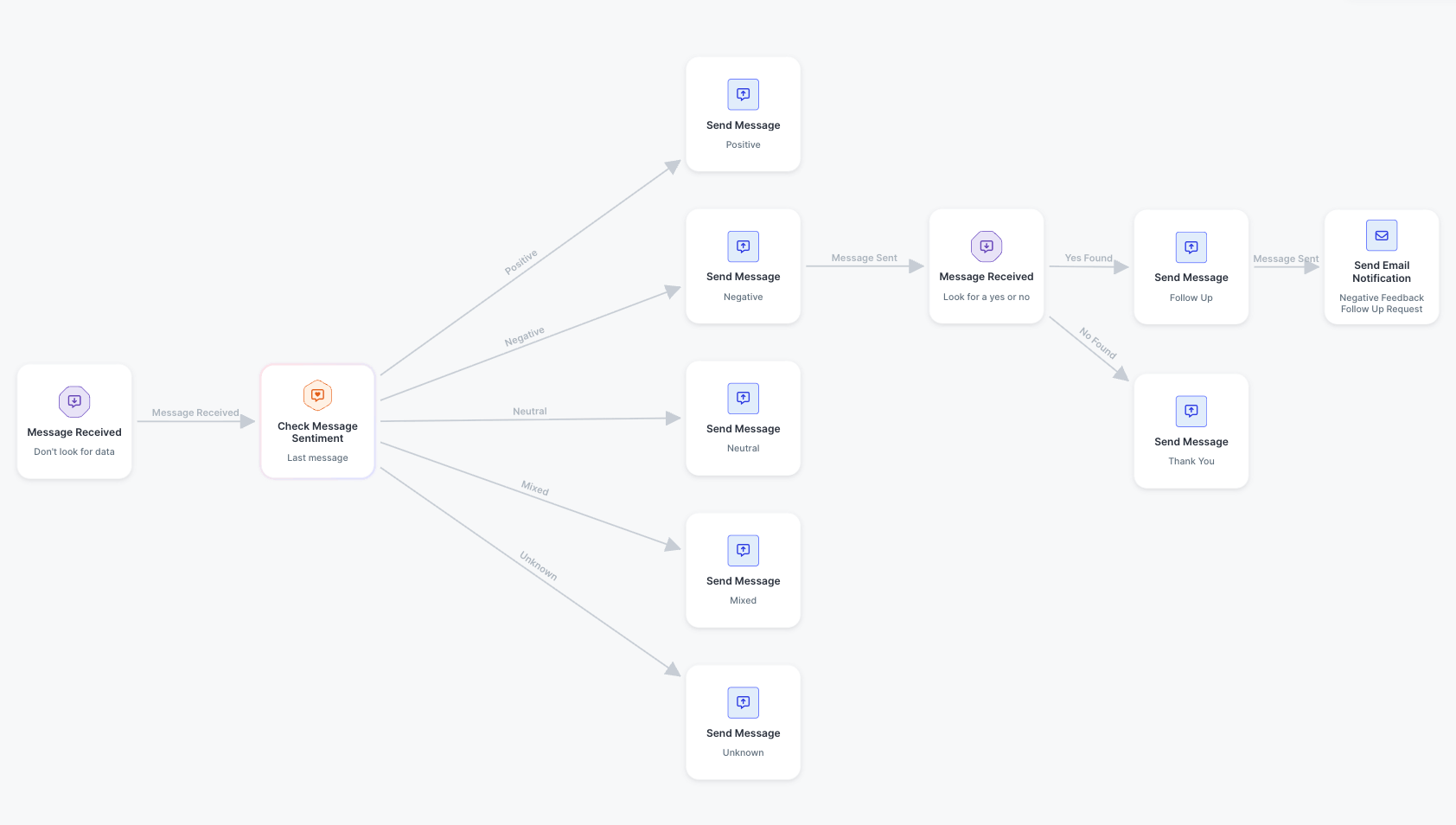
The Review Request template requests feedback from a contact and changes the follow-up based on the sentiment of their response.
A workflow might look like:
- Ask customer about their experience → Customer responds → Evaluate sentiment → Send the appropriate follow-up
SlickText also offers a Product Review template for requesting a review after someone makes a purchase.
Businesses looking for broader feedback can use the NPS Question template, which requests feedback and follows up differently based on the customer’s answer.
Together, review and feedback templates make up 4.66% of templated workflow starts in our data — a solid mid-tier category, reflecting how many small businesses treat reputation and feedback collection as a priority worth automating.
Why You Should Automate Review And Feedback Requests
Review and feedback requests work best when they’re sent consistently. Automation means you don’t have to remember which customers should receive a request or manually follow up with every response.
It can also make the experience more relevant by changing what happens next based on the feedback a customer provides.
4. Keep the Relationship Going After a Purchase
SlickText templates: First Purchase Thank You, Next Purchase Incentive
A purchase doesn’t have to be the end of the customer journey.
Automated post-purchase messages can help you thank customers, stay connected, and encourage them to come back.
SlickText’s First Purchase Thank You template automatically sends a thank-you message to first-time buyers.
That gives you an easy way to acknowledge an important customer milestone without manually identifying every first-time purchaser.
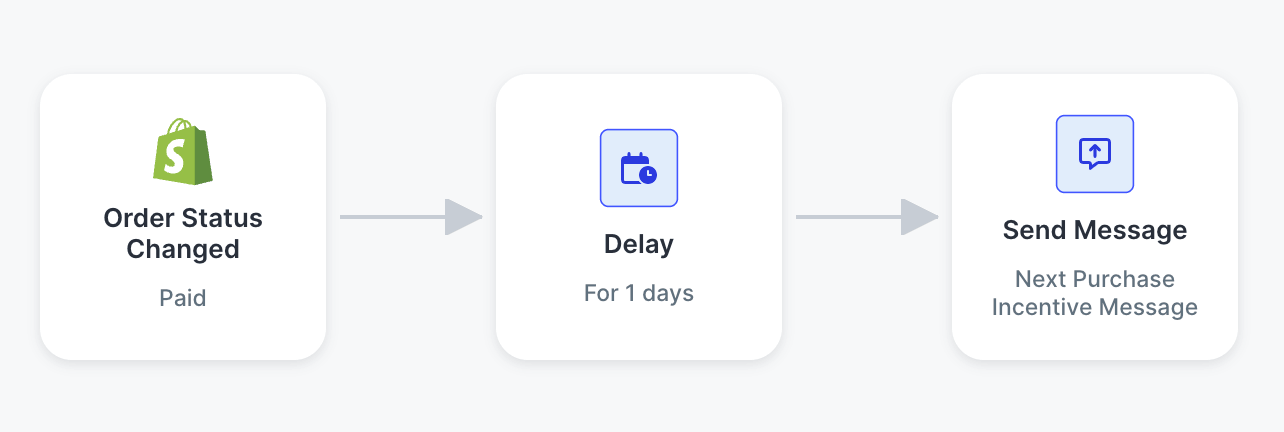
You can also use the Next Purchase Incentive template, which sends a special offer one day after a contact’s most recent purchase.
For example:
- Customer makes purchase → Wait one day → Send special offer
These don’t have to be complicated messages. A simple thank-you or well-timed incentive can keep your business top of mind after the initial transaction.
First Purchase Thank You and Next Purchase Incentive combined account for just 1.66% of templated workflows in our data — a relatively small share, suggesting post-purchase follow-up is an underused opportunity for most small businesses, even though it’s one of the simplest automations to set up.
Why You Should Automate Post-Purchase Offers
The period immediately after a purchase is an easy customer touchpoint to overlook when you’re focused on fulfilling orders and running the rest of your business.
Automating post-purchase communication ensures customers hear from you consistently without adding another manual follow-up.
5. Bring Past Customers Back
SlickText templates: Customer Winback – 30 Days, Customer Winback – 75 Days
Not every customer will naturally return on their own.
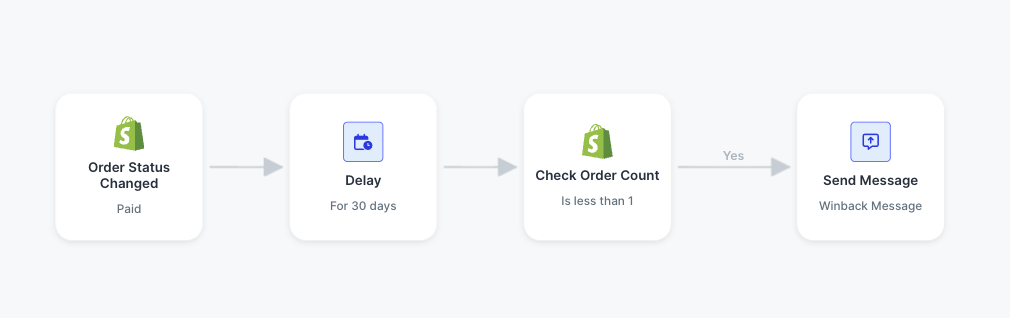
A winback workflow can automatically reconnect with customers when enough time has passed since their last purchase.
SlickText’s Customer Winback – 30 Days template sends a series of messages to a contact if they haven’t made an additional purchase in 30 days.
There’s also a Customer Winback – 75 Days template for businesses with longer purchasing cycles.
That means a small business can choose a timeline that makes sense for how often customers typically return.
A pet supply store might reach back out after 30 days, since food and litter run out on a predictable schedule. A landscaping or lawn care business might wait 75 days, since service needs shift with the season.
Winback templates make up just 1.01% of templated workflows in our data — one of the smallest categories we found. That may reflect how few businesses have a system in place for reconnecting with lapsed customers, despite how valuable that reconnection can be for retention.
Why You Should Automate Customer Winback Messaging
Keeping track of which customers haven’t returned—and how long it’s been—quickly becomes difficult to manage manually.
A winback workflow lets you establish the timing once and automatically reconnect with customers when they reach that point.
For businesses that depend on repeat purchases, this can be one of the most useful automations to put in place early.
6. Follow Up When Customers Abandon Your Website, Cart, or Checkout
SlickText templates: Website Abandoned, Abandoned Cart, Abandoned Checkout, and advanced variations
Customers don’t always finish what they started. Someone browses your site and leaves. Someone adds items to their cart and never checks out. Someone starts checkout and stops before placing the order.
These moments are some of the most common behaviors businesses automate with SlickText. Website, cart, and checkout abandonment workflows combine for 9.77% of templated workflow starts in our data — the third-largest category overall, a clear sign of how often businesses use automation to bring customers back after they drop off. (If you want message copy to start from, our SMS marketing templates collection includes abandoned cart examples by industry.)
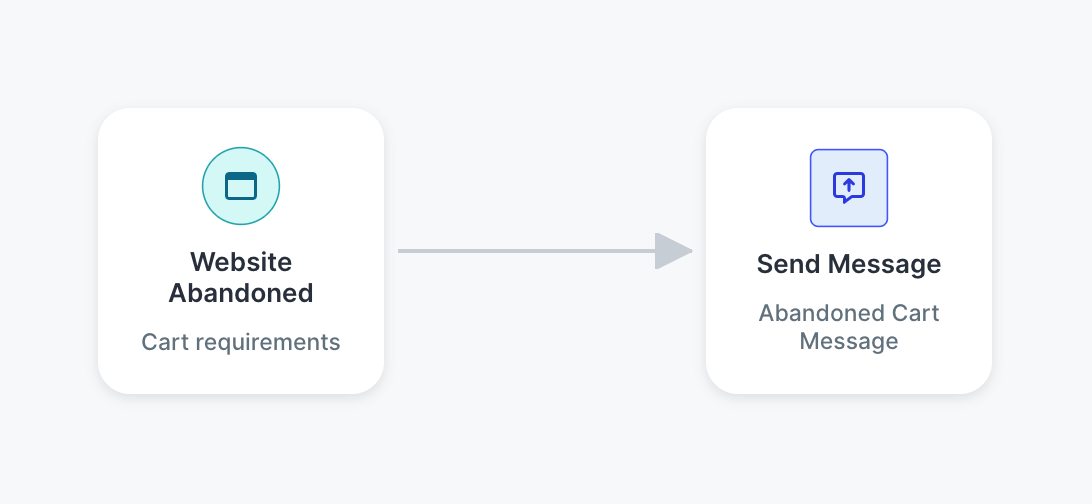
For ecommerce businesses, SlickText’s Abandoned Cart template automatically sends a message when a customer leaves items sitting in their cart. Abandoned Checkout follows up when someone starts checkout but doesn’t complete it. And Website Abandoned sends a message when a contact abandons a session on your site more broadly.
A basic version is simple:
- Customer abandons cart → Send abandoned cart message
But you don’t have to stop there. SlickText also offers templates that let ecommerce businesses make these messages more targeted:
- Abandoned Cart – Item Based
- Abandoned Cart – New vs. Returning Customer
- Abandoned Cart – Value Based
- Abandoned Cart – A/B Test
- Abandoned Checkout – Item Based
- Abandoned Checkout – New vs. Returning Customer
- Abandoned Checkout – Value Based
- Abandoned Checkout – A/B Test
With these, you could send a different message to first-time versus returning shoppers, adjust based on cart value, or follow up only when a specific product was left behind.
That gives small businesses a natural growth path: start with a basic abandonment message, then get more targeted as you learn what resonates.
Why You Should Automate Website, Cart, And Checkout Abandonment
Manually tracking down everyone who leaves your site or abandons a purchase just isn’t realistic. Automation lets you reconnect while their interest is still fresh — and with nearly 1 in 10 SlickText template uses tied to some form of abandonment, it’s clearly a moment businesses see real value in automating.
7. Automatically Send Order and Shipping Updates
SlickText templates: Order Confirmed, Shipment Confirmed, Shipment Out for Delivery, Shipment Delivered, Order Canceled
Some of the most valuable SMS automations aren’t promotional.
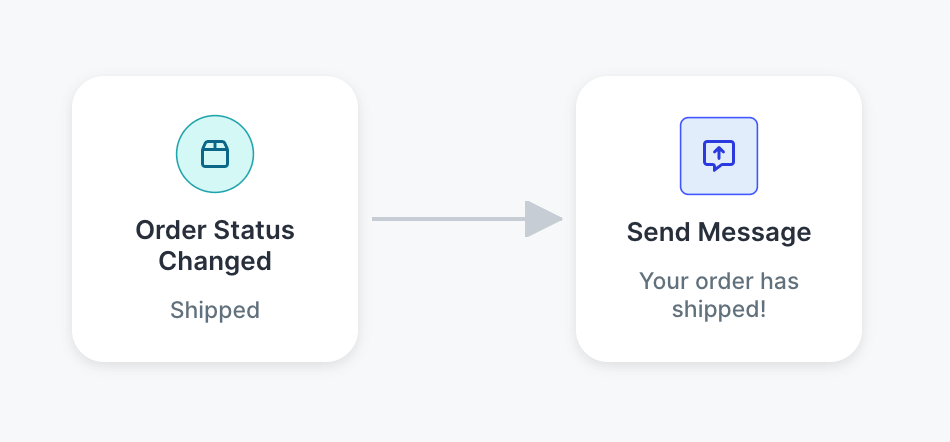
For ecommerce businesses, transactional updates can keep customers informed throughout the purchase and delivery process.
SlickText includes workflow templates for several common order events:
- Order Confirmed
- Shipment Confirmed
- Shipment Out for Delivery
- Shipment Delivered
- Order Cancelled
These templates account for a modest 1.20% of templated workflows in our data — likely because order and shipping updates are sometimes handled by ecommerce platforms directly, making SMS a good complement rather than a standalone solution for most small businesses.
Why You Should Automate Order and Shipping Updates
Customers want to know what’s happening with their orders, but keeping up with those updates on your own would take meticulous, near full-time attention.
Automation lets messages go out when the relevant order event occurs, helping customers stay informed without creating more administrative work for your business.
8. Automatically Send Birthday Messages
SlickText template: Happy Birthday
Some of the easiest automations can also create the most personal customer experiences.
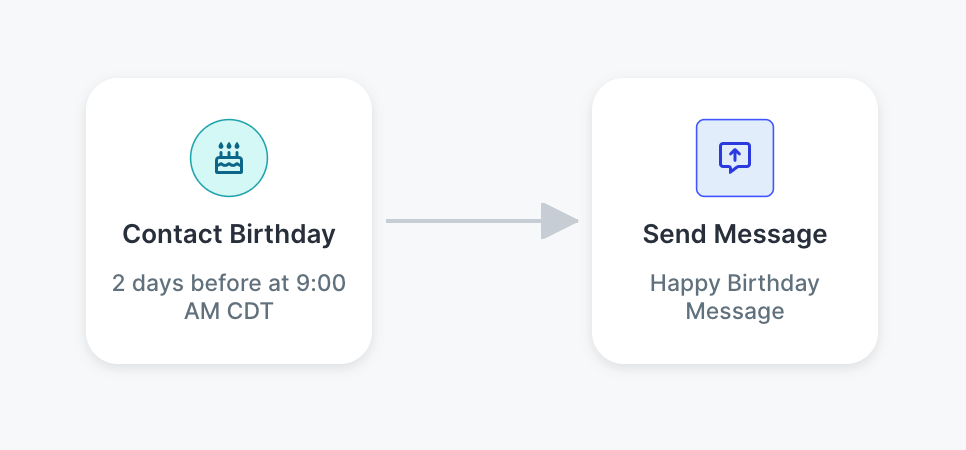
SlickText’s Happy Birthday template lets you automatically send a message on or before a contact’s birthday. The Happy Birthday workflow is one of the easiest to set up but represents only 4.15% of SlickText template use in our data — meaning it’s under-utilized by small businesses.
A coffee shop could send a free drink on their customer’s birthday. A boutique could offer 20% off any purchase that week. A salon could throw in a complimentary add-on, like a deep conditioning treatment, with their next appointment.
The workflow is straightforward:
- Customer’s birthday approaches → Automatically send birthday message
If you haven’t collected birthdays yet, you can set up a workflow to gather that information, too—similar to the contact-collection templates covered earlier. Once you’ve collected a customer’s birthday, you don’t have to remember the date or manually schedule a message every year.
Why You Should Automate Happy Birthday Messages
Birthday messages are a good example of something that’s easy for software to manage and difficult for a person to manage at scale.
Automation lets each customer receive a timely message while your business only has to create the experience once.
What Should Your Small Business Automate First?
The best SMS automation to start with is whichever one matches your biggest current priority: nurturing new subscribers, improving customer data, generating reviews, driving repeat purchases, or keeping birthday and order updates consistent.
With so many things you could automate, figuring out where to begin can feel harder than building the workflow itself. The good news: you don’t have to guess. Match your priority to the workflow below.
- Nurturing new subscribers? Start with a Welcome Series so every new subscriber gets an immediate follow-up.
- Want better customer data? Use Collect Email, Collect First and Last Name, or Collect Address.
- Reviews help drive new business? Start with Review Request.
- Repeat purchases matter? Try Next Purchase Incentive or one of the Customer Winback templates.
- Sell online? Consider Abandoned Cart, Abandoned Checkout, or an automated order-update workflow.
- Already collect birthdays? Happy Birthday is an easy recurring automation to add.
If you’re finding that even your matched starting point feels like more than your current platform can handle — no segmentation, no branching, everyone getting the same blast — that’s usually a sign you’ve outgrown a basic mass texting tool rather than a sign automation isn’t for you.
How do you know if a task is worth automating?
The best first workflow usually isn’t the most sophisticated one. Look for a task that:
- Happens frequently
- Follows a predictable process
- Takes time when you handle it manually
That could be welcoming subscribers, requesting reviews, following up after a purchase, or reconnecting with customers who haven’t returned. Start there.
How SlickText Helps You Build an SMS Automation for Small Business
SMS automation can get sophisticated, but building one shouldn’t be.
SlickText gives you pre-built templates for the most common workflows, so you can launch one in minutes. And when you’re ready to build something more specific to your business, you can start from scratch with the same easy tools.
Here’s what goes into a typical workflow:
- Pick a trigger. A new subscriber, a purchase, a birthday—any customer action or event can start the automation.
- Write the message. Decide what the customer receives the moment the workflow starts.
- Add a delay, if you need one. Control how long the workflow waits before moving to the next step.
- Set conditions. Check a customer’s info or behavior before deciding what happens next.
- Branch it out. Send different customers down different paths when one message doesn’t fit everyone.
- Check in and refine. See how it’s performing and adjust as you learn what works.
You can start simple—like welcoming new subscribers—and build more advanced customer journeys as you go.
That flexibility matters when you’re choosing a platform. Some tools are easy to start with but box you in later. Others are powerful but too complicated for everyday use. SlickText gives you both: the depth to build sophisticated automations, and the simplicity to set one up without a learning curve. (If you’re weighing SlickText against other options, we’ve compared the leading SMS automation platforms side by side.)
Start your free SlickText trial and build your first automated workflow.
Frequently Asked Questions About SMS Automation for Small Business
What is SMS automation?
SMS automation is the practice of using pre-built workflows to send text messages automatically when a customer takes a specific action, like joining your list, making a purchase, or abandoning a cart. Instead of sending each message manually, you set up the workflow once and it runs on its own.
What’s the easiest SMS automation to start with?
A Welcome Series is one of the simplest and most effective automations to start with. It sends a series of messages after someone joins your SMS list, so every new subscriber gets a nurture sequence without any extra effort on your part.
How do I know which automation to set up first?
Start with the interaction that matters most to your business right now. If you’re focused on nurturing new subscribers, start with a Welcome Series. If repeat purchases matter, try a Winback or Next Purchase Incentive workflow. If you sell online, consider Abandoned Cart or order-update automations.
Do I need technical skills to build an SMS automation?
No. SlickText offers built-in workflow templates for common automations like welcome messages, review requests, and abandoned carts, so you can launch one without building it from scratch. You can also customize or create your own workflow as your needs get more specific.
Can I automate more than one type of SMS message at a time?
Yes. Most businesses start with one workflow and add more over time. You don’t need to automate every customer interaction at once. Start with the task that takes the most time or gets missed most often, then expand from there.